Monday, October 5, 2026

AO Office 5.6.8 — Markdown Support

AO Office 5.6.8 is released. This version adds Markdown to the formats AO Office can open and save, fixes two crashes, and makes saving a document one tap shorter.

📝 Markdown

Markdown files can now be opened and saved in AO Office. A .md file sent to you in a message, saved from a note-taking app, or checked into a project opens directly in Writer, and you can edit it and save it back as Markdown.

The formatting that Markdown carries is kept on the way in and on the way out:

  • Headings and lists, both bulleted and numbered.
  • Tables.
  • Links and images.
  • Code blocks and strikethrough.

Because it opens as an ordinary document, you can also use Markdown as a way in and out of other formats — open a .md file and save it as DOCX or PDF, or take a document you already have and save it as Markdown.

💾 Saving Without the Extra Question

Saving a document no longer asks you to confirm its format. When you open a DOCX file, edit it and tap Save, it is saved as DOCX — no dialog in between. Save As still asks, which is where the question belongs.

🛠 Stability

Two crashes are fixed in this release: one when switching between sheets in Calc, and one when moving between the pages of an options dialog.

📦 A Smaller Download

Text conversion data that the app never used has been removed, so AO Office is a smaller download and takes less space on your device.

🙏 Thank You

Thank you for using AO Office and for the reports that tell us what still needs fixing. As always, AO Office works entirely offline, needs no account, and asks for no unusual permissions.

Friday, September 18, 2026

AO Office for Mac

AO Office is now available for the Mac. It is the same office suite we have been building for iPhone and iPad, built for macOS and running natively on Apple silicon.

Like the mobile version, it is based on Apache OpenOffice 4.1.16, the open-source office suite used around the world for over twenty years.

What is in it

  • Word processing — letters, reports and long documents with styles, tables, images, headers and footers. Opens and saves Word (.doc, .docx), OpenDocument Text (.odt) and RTF.
  • Spreadsheets — formulas, functions, charts, sorting and filtering. Opens and saves Excel (.xls, .xlsx), OpenDocument Spreadsheet (.ods) and CSV.
  • Presentations — slides with layouts, transitions and animations. Opens and saves PowerPoint (.ppt, .pptx) and OpenDocument Presentation (.odp).
  • Drawing — diagrams, flowcharts and illustrations with shapes, connectors and text.

On the Mac

  • Runs natively on Apple silicon.
  • Familiar menus and keyboard shortcuts.
  • Open files from Finder, or drag them onto the app.
  • Work on several documents at once in separate windows.

Markdown

Markdown files can be opened and saved on the Mac as well. Headings, lists, tables, links, images, code blocks and strikethrough are kept.

Your files

Any document can be exported to PDF. Files open from iCloud Drive or any folder, everything stays on your Mac, and no account is needed.

AO Office for Mac requires a Mac with Apple silicon.

AO Office on the Mac App Store

Monday, August 24, 2026

AO Office 5.6.7 — Apache OpenOffice 4.1.16 and Better Word Compatibility

AO Office 5.6.6 is released. This version updates the code base to Apache OpenOffice 4.1.16 and improves how Word documents keep their formatting when you open and save them.

📦 Apache OpenOffice 4.1.16

Apache OpenOffice is an open source project under the Apache License, and AO Office is built on its source code.

The code base has been updated from 4.1.15 to 4.1.16, the latest version. It includes security updates, so updating is strongly recommended.

The detailed information about Apache OpenOffice 4.1.16 is here:

📄 Better Word Compatibility in Writer

A document that looks right on your iPhone or iPad should look the same when someone opens it in Word. This release improves Word (DOCX) compatibility across three areas:

  • Text formatting — drop caps, highlighting and background colour, superscript and subscript, and character spacing.
  • Paragraph and list formatting — line spacing, tab stops, borders, and numbering styles.
  • Tables — column widths and background shading.

Document fields are fixed as well. Template Name, Created, Edit Time and Macro Button fields no longer lose their content or format in Word files, and a fixed Initials field keeps its content when a DOC file is opened.

💾 A Quicker Save As

The file type list in Save As has been reordered so the formats people actually use come first, instead of being buried among the ones they never pick.

🙏 Thank You

Thank you for using AO Office and for the reports that tell us which documents still come back wrong. As always, AO Office works entirely offline, needs no account, and asks for no unusual permissions.

Wednesday, March 5, 2025

Encryption support

 In AO Office version 5.5.4, we support loading and saving modern encryptions for DOC / XLS / PPT / DOCX / XLSX / PPTX.

We support encryption in AO Office as below:

  • ECMA-376 Document Encryption (Aglie Encryption)
    • DOCX / XLSX / PPTX
      • Office 2007 SP2, Office 2010, Office 2013 ...
  • ECMA-376 Document Encryption (Standard Encryption)
    • DOCX / XLSX / PPTX
      • Office 2003, Office 2007, Office 2007 SP1, Office 2007 SP2, Office 2010, Office 2013 ...
  • Office Binary Document RC4 CryptoAPI Encryption
    • DOC
      • Word 2002, 2003, 2004
    • XLS
      • Excel 2002, 2003, 2007, 2010
    • PPT
      • PowerPoint 2002, 2003, 2004
  • Office Binary Document RC4 Encryption
    • DOC
      • Word 97, 98, 2000
    • XLS
      • Excel 97, 98, 2000
  • XOR Obfuscation
    • DOC
      • Word 2002, 2003, 2004
    • XLS
      • Excel 2002, 2003

Tuesday, September 3, 2024

AO Office Version 5.4.8 Released - Improved Character dialog by adapting native UI.

 AO Office Version 5.4.8 Released 


Improved dialog in Character by adapting native UI.


In this version, the dialog in Character has been nativized.


<Font>

[iOS Version]


[PC Version]


<Font Effects>

[iOS Version]


[PC Version]


<Position>

[iOS Version]


[PC Version]


<Asian Layout>

[iOS Version]


[PC Version]


<Hyperlink>

[iOS Version]


[PC Version]


<Background>

[iOS Version]


[PC Version]


Tuesday, July 9, 2024

AO Office Version 5.4.5 Released - Improved Paragph dialog by adapting native UI.

AO Office Version 5.4.5 Released 


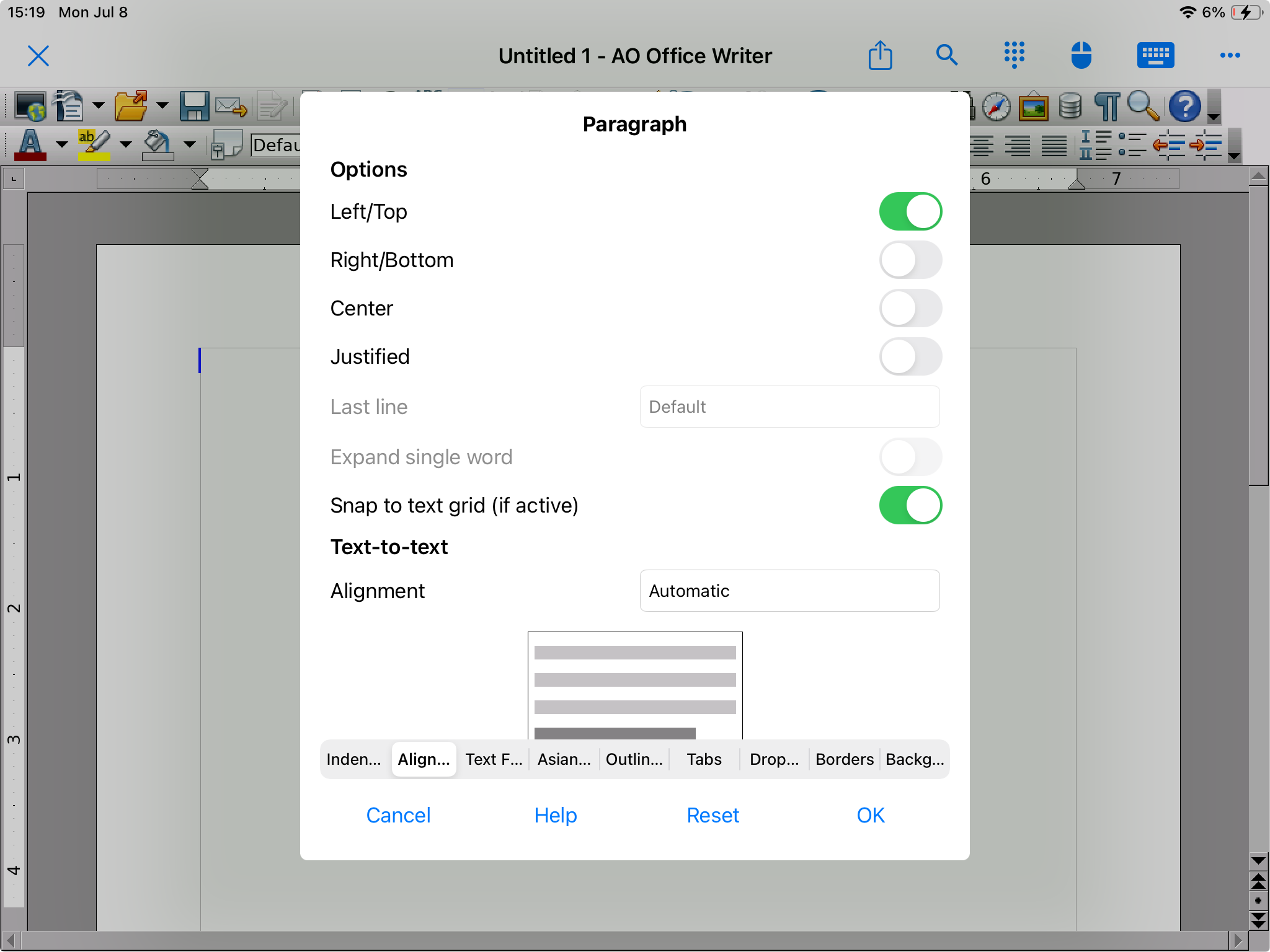
Improved dialog in Paragraph by adapting native UI.


In this version, the dialog in Paragraph has been nativized.


<Indent & Spacing>

[iOS Version]


[PC Version]


<Alignment>

[iOS Version]


[PC Version]


<Text Flow>

[iOS Version]


[PC Version]


<Asian Typography>

[iOS Version]


[PC Version]


<Outline & Numbering>

[iOS Version]


[PC Version]


<Tabs>

[iOS Version]


[PC Version]


<Drop Caps>

[iOS Version]


[PC Version]


<Borders>

[iOS Version]


[iOS Version]


<Background>

[iOS Version]


[PC Version]


Monday, June 24, 2024

AO Office version 5.4.4 - Update code base to Apache OpenOffice 4.1.15

 AO Office version 5.4.4 is released.


Update code base to Apache OpenOffice 4.1.15


Apache OpenOffice is an open source project with Apache License.


AO Office is based on the source code of the Apache OpenOffice and that was version 4.1.15.


The code base is updated to version 4.1.15, the latest version.


It includes the security updates and is strongly recommended to update to the latest version.


The detailed information about Apache OpenOffice 4.1.15 is here: